
01
Connect your Microsoft 365 tenant
Our experts set up Archiveo with your tenant and your retention schedule — no infrastructure to deploy.


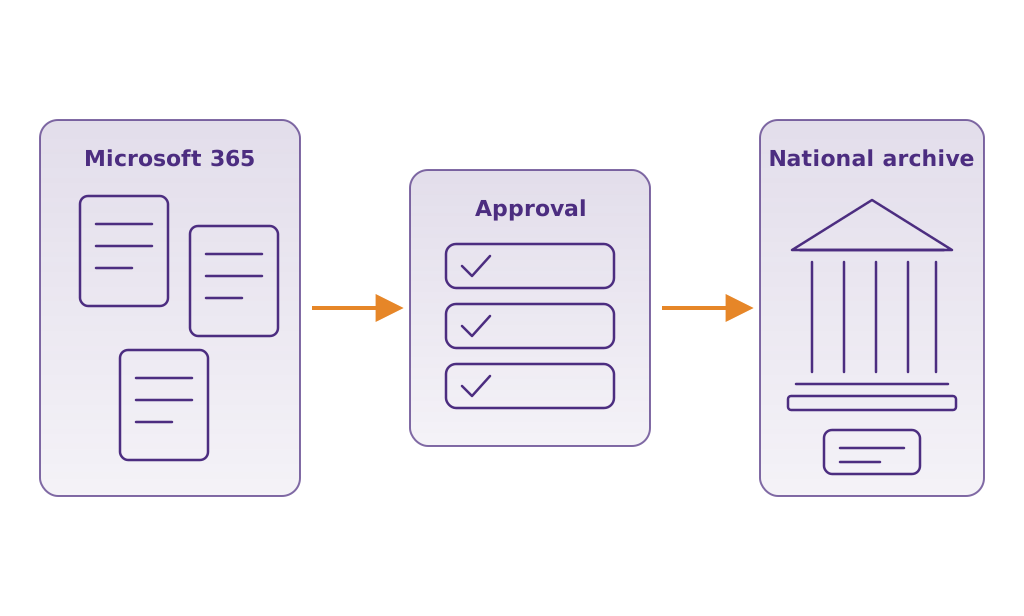
Archiveo streamlines mandatory records archiving for government and public entities. Archivists review Microsoft 365 files, route them through an approval workflow, transfer approved records to the national archive, and generate compliance reports — all from one place.
Book a Demo
Archiveo is a Microsoft 365 records-archiving solution for government and public bodies. When records reach the end of their legally mandated retention period, public bodies must transfer them to the national archive. Archiveo lets archivists review Microsoft 365 files and folders, identify the records to transfer, route them through an approval workflow, transfer approved records to the national archive, and generate compliance reports — replacing slow, error-prone manual work.
For Archivists
A purpose-built interface for reviewing Microsoft 365 content against your retention schedule.
Approval Workflow
Transfer & Compliance
From Microsoft 365 to the national archive in three steps.
Our experts set up Archiveo with your tenant and your retention schedule — no infrastructure to deploy.
Archivists identify the records that must be transferred and route them through the approval workflow.
Approved records are transferred to the national archive and compliance reports are generated automatically.
See how Archiveo takes your organization from manual, error-prone transfers to a reviewed, approved, and documented archiving process.
Book a Demo